
Common Elevator Display Problems and their Solutions
Common Elevator Display Problems and Their Solutions In Elevator Display Systems
Elevator displays play a key role in passenger safety and comfort. These screens show floor numbers, direction arrows, alerts, and sometimes emergency messages. When a display fails, it can confuse users, slow down building traffic, and raise safety concerns. Understanding the most frequent issues and knowing how to address them helps maintenance teams reduce downtime and improve reliability.
This guide explains the most common elevator display problems, why they happen, and how professionals typically solve them.
Elevator Display Issues and Their Solutions for Reliable Operation
Elevator display systems provide critical information such as floor position, travel direction, and operational status. When these systems develop faults, it can lead to confusion, reduced passenger confidence, and maintenance challenges. Understanding the causes behind common elevator display problems and applying the right solutions helps ensure accurate communication, smoother operation, and improved overall system reliability.
1. Blank or Completely Dead Display
One of the most noticeable problems is when the screen goes completely blank. Passengers see no floor number, no movement indication, and no system feedback. This issue is often mistaken for a major control failure, but in many cases, the cause is simpler.
Power supply interruptions are a common reason. Loose wiring, blown fuses, or unstable voltage can cut power to the display unit while the elevator itself continues to operate. In older systems, worn connectors and oxidized terminals also contribute to this issue.
The solution starts with checking the power line feeding the display. Technicians inspect fuses, test voltage stability, and verify grounding. If power is present, the next step is examining internal components such as capacitors or backlight drivers. Replacing damaged parts usually restores normal operation without replacing the entire unit.
2. Incorrect Floor Indication
Another frequent complaint is incorrect floor numbers appearing on the screen. The elevator may stop at the correct level, but the display shows a different floor or skips numbers entirely. This creates confusion, especially in hospitals, hotels, and commercial buildings.
This problem is often linked to sensor or encoder misalignment. Elevators rely on position feedback devices to calculate location. If these components drift out of calibration, the display logic receives wrong data. Software configuration errors after maintenance work can also cause mismatched floor mapping.
Solving this requires recalibrating the position sensors and verifying floor count settings in the control panel. Technicians also test signal consistency during slow and full-speed runs. Once alignment is corrected, the display synchronizes properly with actual movement.
3. Flickering or Dim Screen
A flickering or unusually dim elevator display is usually a warning sign of electrical or component aging issues. While the display may still function, readability becomes poor, especially in low-light environments.
Common causes include failing backlight modules, unstable voltage regulation, or worn display panels. In some cases, heat buildup inside the panel enclosure accelerates component degradation. Dust accumulation can also reduce heat dissipation and worsen the issue.
The solution involves measuring voltage stability and inspecting backlight circuits. Replacing the backlight or inverter often resolves flickering. If the display panel itself is worn out, upgrading to a newer module improves brightness and long-term reliability. Proper ventilation and routine cleaning help prevent repeat failures.
4. Frozen or Unresponsive Display
Sometimes the screen remains stuck on a single floor number or message even though the elevator is moving normally. Buttons respond, doors open, but the display does not update. This is a common sign of communication failure.
Most modern systems rely on serial or network communication between the controller and the display board. Loose data cables, damaged connectors, or signal interference can interrupt updates. Firmware glitches may also cause the display software to freeze.
Technicians usually start by checking communication lines for continuity and noise. Reseating connectors and replacing damaged cables often solves the issue. If hardware checks out, a firmware reset or controlled software update is performed. Stable communication restores real-time display updates.
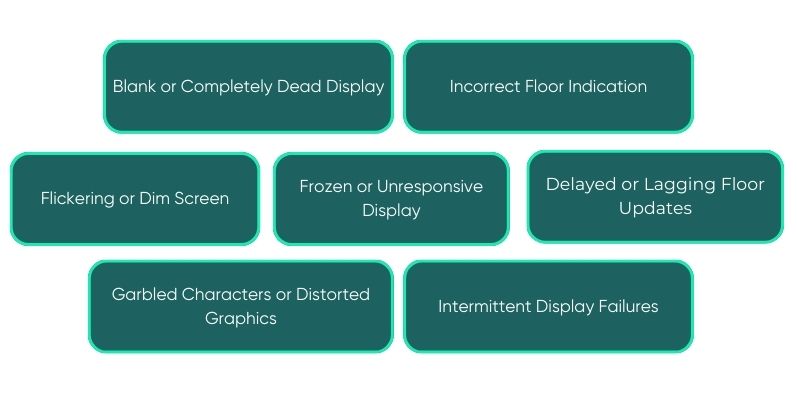
5. Delayed or Lagging Floor Updates
A delayed display shows the correct information, but with noticeable lag. Floor numbers update seconds after the elevator has already stopped or passed a level. While this may seem minor, it can affect user confidence and system perception.
This issue is commonly caused by slow data processing, outdated firmware, or overloaded control boards. In some systems, added features such as multimedia displays increase processing load and slow response times.
The solution focuses on optimizing software settings and reducing unnecessary background processes. Firmware updates often improve response speed. In older systems, upgrading the display controller may be necessary to match modern performance expectations.
6. Garbled Characters or Distorted Graphics
Another problem seen in aging systems is distorted text or unreadable symbols. Numbers may appear broken, incomplete, or scrambled. This issue is more common in LED or segmented displays exposed to vibration and temperature changes.
Damaged driver chips, failing display matrices, or signal corruption usually cause this problem. Environmental stress, such as high humidity, accelerates internal damage over time.
Repair options depend on severity. Minor driver issues can sometimes be fixed by replacing specific components. In most cases, replacing the display module is more cost-effective and ensures clear, stable visuals.
7. Intermittent Display Failures
Intermittent issues are among the hardest to diagnose. The screen may work perfectly for days, then fail suddenly, only to recover later. These problems often point to loose connections or temperature-sensitive components.
Vibration during operation can slowly loosen connectors. Expansion and contraction due to temperature changes may also affect solder joints. Power fluctuations in the building supply can worsen the issue.
Solving this requires careful inspection during both normal and fault conditions. Technicians secure connectors, reinforce weak solder points, and stabilize power inputs. Preventive maintenance plays a major role in eliminating intermittent failures.
Preventive Maintenance for Display Reliability
Many display failures can be avoided with proper maintenance routines. Regular inspections help catch early signs of wear before total failure occurs. Cleaning dust from panels, checking wiring integrity, and verifying voltage levels all contribute to longer service life.
Using quality components sourced from trusted elevator parts suppliers reduces failure rates. Compatibility between controllers and display units is equally important. Mismatched components often lead to communication and performance issues.
Building owners who work with reliable suppliers such as Elevator Mart benefit from access to tested components and technical guidance, reducing unexpected downtime.
Maintaining Efficient and Accurate Elevator Display Systems
Elevator display systems may seem like small components, but they directly affect user experience and safety perception. From blank screens to incorrect floor indicators, each problem has a specific cause and a practical solution. Addressing issues early prevents confusion, reduces service calls, and extends system life.
By understanding common elevator display problems and following structured troubleshooting methods, maintenance teams can keep displays accurate, clear, and reliable. Consistent care and informed decisions ensure smooth operation for both passengers and building managers.